Business Tip: How to setup
Google Business Profile
How to Set Up Your Google Business Profile (2025 Guide)
Google Business Profile (formerly called Google My Business) is one of the most powerful tools for getting free exposure on Google Search and Maps. When properly optimized, your listing can generate calls, website visits, and new customers every single day — without paying for ads.
This 2025 guide shows you exactly how to set up and optimize your profile the right way.
Why Google Business Profile Matters
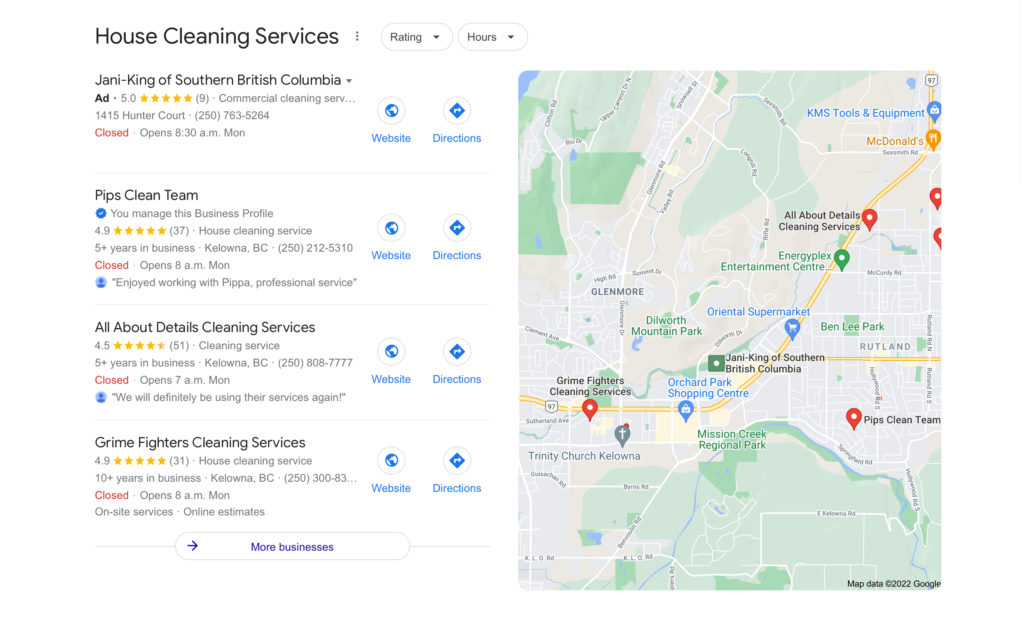
A complete profile increases your chances of appearing in:
The Google Map Pack (top 3 listings in local searches)
Google Maps searches
Mobile “near me” searches
Businesses with strong profiles receive:
More calls
More driving direction requests
More website visits
Google rewards businesses with accurate info, photos, and active engagement.
Step 1: Sign In Using Your Business Google Account
Go to: https://business.google.com
If you already use Gmail for business, log in with that.
If not, create a business Google account before setting up your profile.
Step 2: Add or Claim Your Business
Google will ask for:
Business name (exactly as it appears on signage and branding)
Business category (e.g., “Air Duct Cleaning Service”, “Wedding Venue”, “Marketing Agency”)
If your business already appears on Google Maps:
Click “Claim this business”
Complete the verification process
If it doesn’t appear:
Click “Add your business to Google”
Step 3: Choose Your Business Type
You’ll see three options:
Storefront (customers visit your location)
Service Area Business (you go to them — e.g., cleaners, plumbers, mobile services)
Hybrid (you have a location, but also service customers elsewhere)
If you’re a service-area business:
Enter the cities or areas you serve
Do not display your home address
Step 4: Add Contact Details and Website
Enter:
Phone number
Website URL (or use Google’s free website if you don’t have one)
Tip: Use the same phone number across your website and directories.
This helps local SEO.
Step 5: Verify Your Business
Google may verify by:
Text message
Email
Phone call
Live video verification
Postcard (traditional method)
Verification must be completed before your listing shows publicly.
Step 6: Optimize Your Profile for Maximum Visibility
Add your business description
Write naturally. Include what makes you unique and your service area.
Example:
“We provide dryer vent and air duct cleaning services in Kelowna, Lake Country, and Vernon.”
Keep it informative, not keyword-stuffed.
Add photos & video
Google profiles with photos get more clicks.
Upload:
Exterior (so people recognize your location)
Interior (if applicable)
Staff / team photos
Before + after work (perfect for air duct + dryer vent businesses)
Logo, branded vehicles, products, etc.
Add services
List each service individually along with short descriptions.
Example:
Dryer Vent Cleaning
Air Duct Cleaning
Multi-unit / Commercial Services
Add attributes
Examples:
Women-owned
Veteran-owned
Online appointments available
Step 7: Post Regular Updates (Once Per Week)
Treat Google like a social platform.
Recommended posts:
Promotions
New products or services
Before/after work
Customer testimonials
Active profiles rank higher than inactive ones.
Step 8: Ask for Reviews — and Respond to Them
Reviews are a ranking factor.
Ask after every completed job:
“Hi ___, would you mind leaving us a quick Google review? It really helps local businesses like ours. Here’s the link: [insert review link]”
Respond to every review — even short ones.
Google values businesses that engage with customers.
Step 9: Monitor Performance
In Google Search, type your business name and click “Performance.”
You’ll see:
How many people found you
Where they saw your business (Maps or Search)
How many people called, clicked, or requested directions
Use this data to adjust your strategy.
Quick Checklist (2025)
Your listing is properly optimized if you have:
Business name is accurate
Service areas added
Complete contact info
Description filled in
At least 12+ photos uploaded
Services added
Weekly posts
Continuous reviews coming in
Need help optimizing your listing?
We build and optimize Google Business Profiles that rank.
Marketing in Motion — Kelowna’s Local SEO & Lead Gen Experts
Since 2006, we’ve helped local businesses show up, stand out, and get more customers.
Request our setup + optimization package:
https://mimmarketinginmotion.com/contact